Styles / Fashion & commercial
Glossy beauty retouch
- Key, high: a large soft source, 90 × 65 cm, 95 cm from the face, straight in front, 52 cm above the eyes.
- Fill below chin: a large soft source, 80 × 40 cm, 80 cm from the face, straight in front, 53 cm below the eyes.
To scale, from the render’s scene file. One way to get this light, not a record of how any photograph was lit.
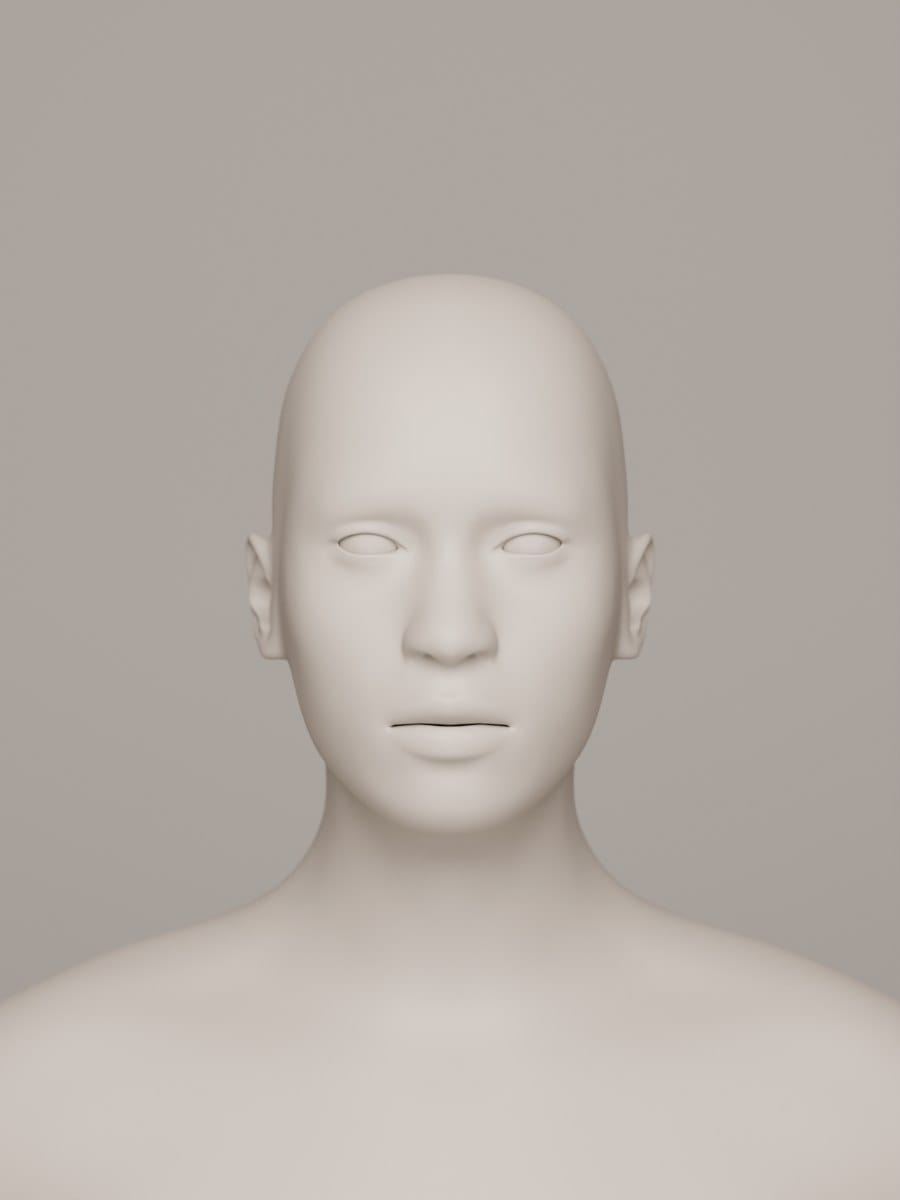
Rendered with this plan. A large soft key above the lens and weaker fill below the chin, keeping shallow nose and jaw shadows (the studio light, not makeup or retouching).
Render: a synthetic clay head made with MakeHuman, not a person, in Blender Cycles, 85 mm, f/5.6.
The photographs that define it are still in copyright, so they are linked below rather than shown.
The glossy close-up strand of digital beauty photography: faces, eyes and lips become meticulously finished surfaces: tight crops, explicit makeup design, controlled gloss and clean digital detail. Studio light and local retouching even the complexion while retaining believable texture; saturated cosmetics stand out against quieter skin. Unlike the monochrome Hollywood star portrait or the whole-object packshot, the beauty close-up enlarges selected facial details into an editorial or advertising image.
Built mostly on one system: Sweet retouch. What systems are.
Shoot sheet for your kit A prompt for an image model The photographs Its portrait light in the lab
How the look is made
- Crop into a face or isolate an eye or mouth so makeup and surface detail, rather than clothes or location, carry the picture.
- Build the makeup, hair and colour idea before shooting; inspect the capture with the creative team instead of relying on repair afterwards.
- Shape a readable highlight on gloss with a large source; use fill to retain facial detail without erasing the modelling.
- Focus precisely and stop down enough to resolve the intended facial plane; distinguish crisp cosmetic detail from indiscriminate sharpening.
- Even distracting tonal patches with local dodge and burn and selective texture repair; retain pores, facial identity and deliberate highlights rather than blurring the whole face.
Shoot sheet for your kit
Fill in your camera, lenses and lights, and the sheet says which light plays each part, what to work around and where to start on your camera. Without a kit it starts on a full-frame camera.
Light
Key: a softbox, about 40° to the camera’s left, high, soft.
Fill: a softbox, about 35° to the camera’s right, soft.
- Key high: about 30–45° above eye level, angled down.
- Shadow edges
- Shadows that fade gradually from light to dark, cast by a large or diffused light: a window, a softbox, a cloudy sky.
- Shadow depth
- Shadows kept light and full of detail by a reflector, a fill light, bounce or bright surroundings (a low lighting ratio, up to about 3:1: the shadow side at most a stop and a half darker).
- Shape & form
- Light turning gradually into shade across faces and objects, so their volume shows.
- Highlights
- Small, bright glints where the light reflects off wet, oily or polished surfaces: glistening food, dewy skin, the sparkle of jewellery or chrome. Bright, clearly shaped reflections of the light in the eyes (a window, a ring, a softbox), made a feature of the portrait.
How the style is lit
- A large diffused key just above the lens with a weaker reflector or fill below the chin: a shallow nose shadow, open eye sockets and a rounded, glossy face rather than a shadowless cut-out.
- For a lip detail, place a large softbox or octagonal source near the camera axis and adjust its angle until its reflection runs cleanly across the gloss; flag spill and retain the dark mouth interior.
This plan is worked out from the style’s choices, so it is drawn as a schematic. The set-up at the top of the page is the one we rendered, to scale. One way to get the light, not a record of how any photograph was lit.
Lens and settings
Start at
On a full-frame camera: the same depth of field and exposure as the style’s own numbers, in the same light. Then meter and adjust.
- Then
- 100 mm · f/8–f/13 · 1/160 s · ISO 100 on full frame, documented. One published practitioner workflow, not a universal range or specimen EXIF: a 100 mm macro on full frame, ISO 100, 1/160 s, at least f/8 for head-and-shoulders and f/13 or narrower for macro. This entry stops the suggested interval at f/13; adjust for magnification and flash sync.
- White balance
- Match balance to the studio light with a neutral reference, then refine skin and cosmetic colour separately without imposing a global cast (inferred, not specimen metadata).
- Focal length
- Very close focus: small things at life size or larger. A long lens stacks distant planes close together.
- Angle
- The camera at the height of a standing person or of the subject.
- Distance
- Within arm’s reach: faces, hands and details fill the frame.
- Balance
- The subject in the middle, the frame balanced around it.
- Crop & fill
- The edges cut into the subject: heads, limbs or objects run out of frame.
- Duration
- An unmoving scene, exposed slowly and carefully.
Direct
Direct an adult sitter in small head turns with a composed gaze; relax or slightly part the lips for cosmetic details, turn lowered eyelids towards the camera for eye makeup, and bring hands near the face only when they support the crop. Keep the chosen facial plane steady between frames.
- Turn to the camera
- The body, the head or both turned about 45° from the lens, so one side is nearer the camera and the far ear is hidden.
- Head & gaze
- Looking straight into the camera, so the subject meets the viewer’s eye.
- Expression
- Unsmiling, composed and blank: the face gives nothing away.
- With the sitter
- The subject performs for the camera and shapes the picture. The sitter arranged and still, facing the camera.
Style the set
Plan hair, makeup and backdrop together, from clean grooming to graphic eye decoration or metallic lips. Use gloss selectively on lips or skin; keep clothing and environmental detail subordinate. The polished result need not erase freckles, pores or the sitter's individual features.
- Hair & make-up
- Groomed hair and finished make-up that still look natural: even skin, defined eyes, neat brows. Visible artifice: sculpted brows, strong lips, lashes, contouring and set or sculpted hair. Hair and make-up as art: graphic colour, glitter, prosthetics, extreme shapes.
- Set & props
- A painted, cloth, paper or seamless backdrop behind the subject.
- How much is styled
- Clothes, hair, make-up, props and set all chosen and placed by a team to one idea.
- Look of the styling
- Clothes, props and set kept to a few chosen colours that work together.
Finish
- Colour
- White balanced to the light, so whites stay white and skin, food and products keep their real colour, with no overall cast. Strong, dense colours.
- Digital & other
- A modern digital camera: clean, detailed, neutral.
- Texture
- Smooth tones with no visible grain.
- Post-production
- Perfected skin and surfaces.
- Shown as
- Each picture stands on its own.
- Shown in
- Pictures made for magazine pages and spreads. Pictures made to sell, shown large.
Stay away from environmental, candid & unobserved, visible grain, scratches, dust & decay, soft focus & diffusion, straight print, faded & matte and unstyled, as found.
Before you shoot it
These examples depict real models and the work of living photographers, makeup artists and retouchers. Study shared production choices, not a named practitioner's signature or a portfolio image to copy; credit the whole creative team and obtain the sitter's consent for retouching and publication. Do not treat pores, age, disability, skin colour or facial differences as defects, lighten darker skin to meet a beauty norm, or silently reshape identity.
A prompt for an image model
A ready prompt that describes this look to an image model: where the lights stand, the lens, the framing and the colour. It starts on the style’s own choices; change any of them and the prompt and the notes follow.
The prompt
Notes on this prompt
- This is the set-up rendered at the top of the page, so the prompt puts its lights where the render has them. Image models put the light in the wrong place more often than anything else, so the prompt says where each light stands: which side of the picture, and how high. Keep to one light pattern per prompt, or the model splits the difference.
- Describe an invented person by age, clothes and pose. Never name a real or famous person, and never write “looks like”.
- Heavy retouching: ask for smooth skin that keeps its pores, or the model makes it look like plastic.
The model makes a new picture, not a photograph of anything that happened. Label it as AI-generated, and don’t pass it off as the style’s history or as a real person.
Where to see it
From open collections, shown whole with their credits. Later photographs are linked, not shown, while they are in copyright.
In copyright, so linked
- Laura: metallic gold lip detail (descriptive title) , Julia Kuzmenko McKim; makeup by VladaMUA, published 26 April 2016; capture date not stated. Master Beauty Photography, Julia Kuzmenko McKim.
- Braina: purple glossy lips with a blackberry (descriptive title) , Julia Kuzmenko McKim; makeup by VladaMUA, published 26 April 2016; capture date not stated. Master Beauty Photography, Julia Kuzmenko McKim.
- Glossy Skin , Laura Bello, published 3 July 2017; capture date not stated. Master Beauty Photography, Laura Bello.
Made by an AI model
An image gpt-image-2 made from this style’s choices, then checked against them by a vision model. Not a photograph, and not part of the style’s history. All generated images
-
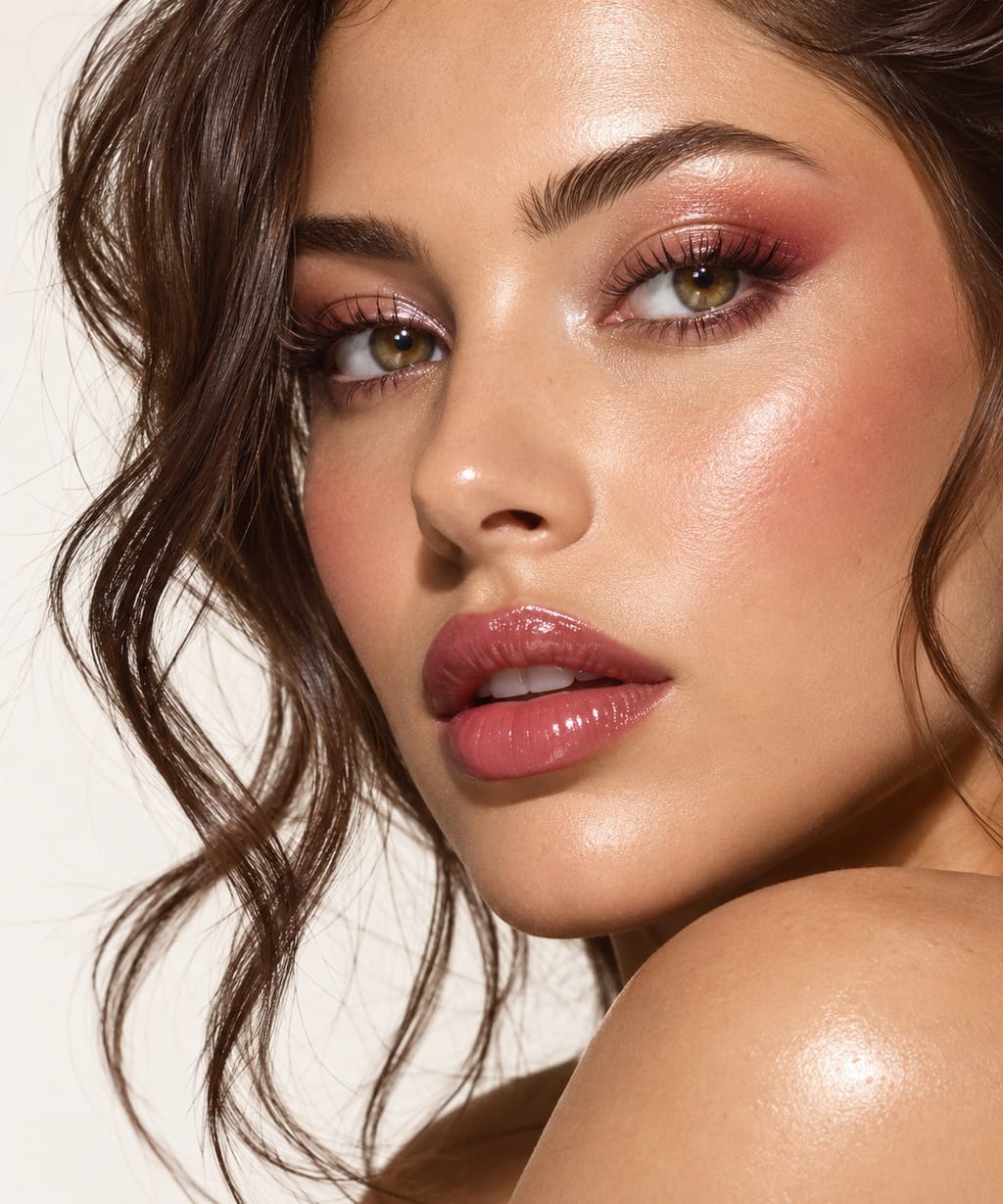
A tightly cropped beauty portrait of a woman looking toward the camera over a bare shoulder, with dark wavy hair and hazel eyes. Shimmering rose eye makeup, glossy pink lips and bright highlights on her skin stand out against an off-white background. What the check saw. The photograph uses an extreme close crop and directional lighting to emphasize glossy makeup, skin texture and a polished beauty-editorial appearance.
With other styles
Pairs with Hollywood glamour portraiture. Borrow deliberate facial modelling, but replace the hard low-key monochrome star portrait with coloured cosmetics, closer detail and controlled surface gloss.
The opposite: E-commerce packshot on white. Use the whole-product white-background image to describe packaging; reserve the face crop and reflective makeup for the accompanying beauty image.
The opposite: Meitu beauty-app selfie. Keep the studio-directed cosmetic detail and visible skin texture distinct from arm's-length app beautification and automated facial reshaping.
Sources
- Lauren Collins, Pixel Perfect, The New Yorker, online 5 May 2008, print issue 12 May 2008: https://www.newyorker.com/magazine/2008/05/12/pixel-perfect (original reporting on Box Studios, magazine retouching and the construction of beauty; not evidence that all its work shares this genome).
- Julia Kuzmenko McKim, Macro Beauty For Makeup, Cosmetics and Skincare Photography: Gear & Lighting, published 26 April 2016: https://masterbeautyphotography.com/macro-beauty-makeup-cosmetics-and-skincare-photography/ (credited photographs, 100 mm macro, tethering and modifier reflections).
- Julia Kuzmenko McKim, How to shoot Macro Beauty in Makeup and Skincare Photography: Preparation & Camera Settings, current publication metadata 28 June 2023: https://masterbeautyphotography.com/macro-beauty-for-makeup-cosmetics-and-skincare-photography-preparation-camera-settings/ (ISO 100, 1/160 s, f/8 minimum for faces and f/13 or narrower for macro; source has been updated).
- Laura Bello, Industry Insider: The Art of Flawless Skin — Part I: Photography, 3 July 2017: https://masterbeautyphotography.com/industry-insider-the-art-of-flawless-skin-part-i/ (matte versus glossy skin, clamshell fill, polished versus natural finishing).
- Laura Bello, Industry Insider: The Art of Flawless Skin — Part II: Retouching, 19 July 2017: https://masterbeautyphotography.com/industry-insider-the-art-of-flawless-skin-part-ii/ (local texture repair, dodge and burn, colour control and warnings against plastic skin).